

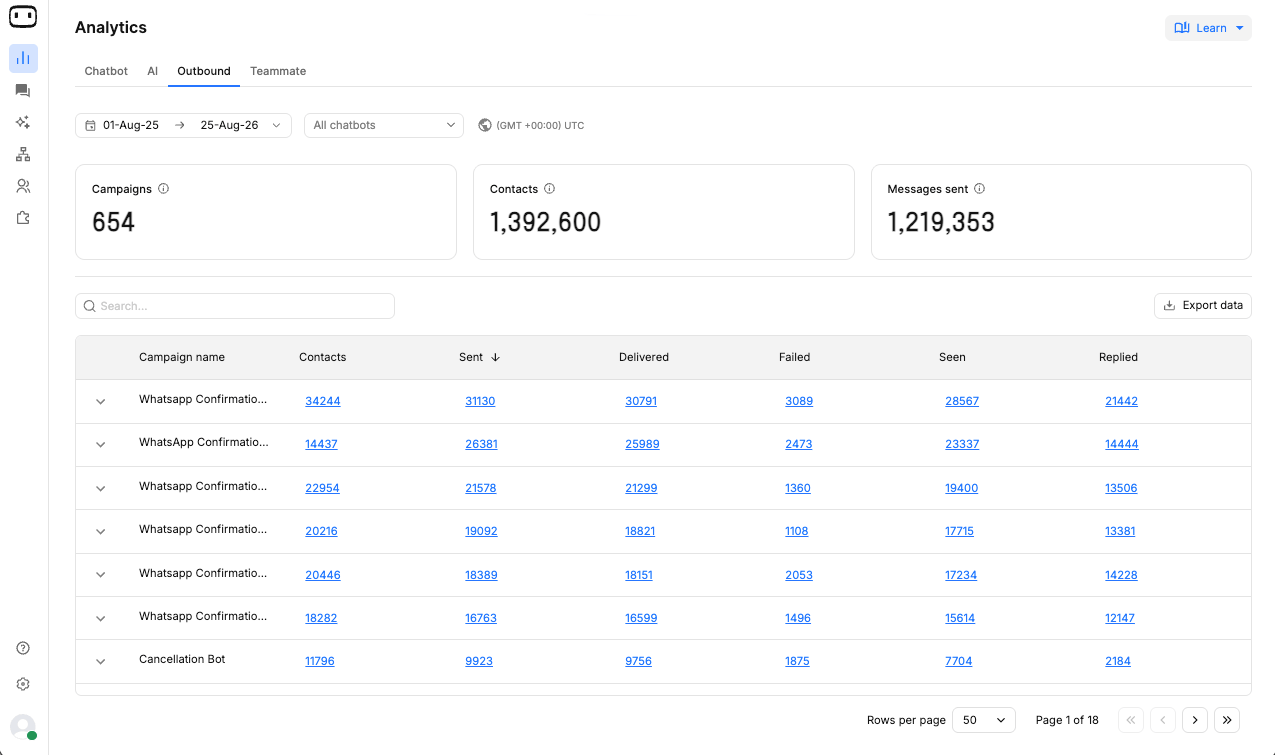
The metrics available depend on the channel. WhatsApp can report read receipts, SMS generally does not provide read receipts, and email can report opens, clicks, and bounces. If a metric or column is not shown for a channel, it may be because that channel does not provide that status.
What this report answers
Use the Outbound Report to answer questions such as:- How many contacts were included in the campaign?
- How many messages were sent and delivered?
- How many messages failed?
- Did recipients read, open, click, or reply to the messages?
- Which campaign performed better than others?
- How did a campaign perform across different channels?
- What did the campaign cost?
KPIs
The Outbound Report displays campaign-level metrics that help you measure delivery, engagement, and campaign performance.Delivery metrics
Delivery metrics show how many messages were sent, successfully delivered, or failed during an outbound campaign.Sent and Delivered are different metrics. A message can be successfully sent to the messaging provider but may not be delivered to the recipient. Delivery can fail because of issues such as invalid contact information, an unavailable recipient, or provider-level delivery failures.
Engagement metrics
Engagement metrics show how recipients interacted with messages after they were sent or delivered. The available engagement metrics depend on the channel.A zero or missing value does not always mean that there was no engagement. It can also mean that the channel does not provide that measurement.For example, SMS generally does not provide read receipts, while WhatsApp supports Seen status.
The available metrics depend on the channel. For example, WhatsApp supports Seen status, while email supports Clicked metrics. SMS generally does not provide read or seen status. If a metric is not available for a channel, the corresponding column may not be displayed.
Campaign comparison
Use the campaign-level figures to compare the performance of different outbound campaigns. When comparing campaigns:- Compare the Delivered count with the Sent count to understand delivery performance.
- Compare Seen, Opened, Clicked, or Replied figures where those metrics are available.
- Consider the size of each campaign before comparing absolute numbers.
- Use the available rates or exported contact-level data when you need a more detailed comparison.
Cost
Campaign cost depends on the channel and messaging provider. For WhatsApp, messaging costs are based on the applicable conversation category and can vary depending on the type of conversation. For more information about WhatsApp conversation costs, see the Cost and WhatsApp Templates documentation.Channel breakdown
When a campaign uses more than one channel, review the results separately for each channel. Channel-specific metrics can differ. For example:- WhatsApp can report delivery, seen/read, and replies.
- SMS can report delivery and replies, but generally does not provide read receipts.
- Email can report delivery, opens, clicks, and bounces.
Metrics shared with other reports
Some metrics in the Outbound Report may also appear in other reporting views, such as replies and conversation-related counts. Use the metric definition provided in the relevant reporting documentation when the same metric appears across multiple reports. This helps ensure that campaign figures are interpreted consistently with the underlying conversation and contact data.Reading the report
Consider a WhatsApp campaign where most messages are delivered, but the seen rate is low. This indicates that delivery is not the main issue. Recipients received the messages, but relatively few viewed them. Depending on the campaign, this may indicate that you should review:- Template or message content: The message may not be compelling or relevant enough to encourage recipients to open it.
- Timing: The campaign may have been sent when the audience was less likely to view or respond.
- Audience quality: The audience may not be sufficiently targeted or engaged.
- Template category: The selected WhatsApp template category may influence how recipients interact with the message.
Filtering, drill-in and export
Use the report controls to filter campaign results by available criteria such as campaign and channel. You can also drill into metric counts to view the contacts included in a particular result. For common filtering, date range, and reporting controls, see the Reporting overview.Export campaign data
Select Download to export contact-level campaign data as a CSV file. Use the exported data when you need to:- Compare multiple campaigns in more detail.
- Analyze contact-level delivery and engagement results.
- Perform additional calculations outside WotNot.
- Create custom reports using the exported data.

Large exports may take some time to process. After selecting Download, keep the export window open until the file is downloaded.
Common confusions
Why are Sent and Delivered counts different?
Why are Sent and Delivered counts different?
Sent means the message was successfully sent to the messaging provider. Delivered means the message was successfully received by the contact.A message can be marked as sent before it is delivered. Provider processing, recipient availability, or delivery failures can cause the delivered count to be lower than the sent count.
Why does the read rate show zero for SMS?
Why does the read rate show zero for SMS?
SMS generally does not provide read receipts.A zero or missing read metric does not necessarily mean that nobody read the message. It can mean that the SMS channel does not provide read information.WhatsApp supports read receipts, so read metrics can be reported for WhatsApp messages.
Why is the campaign audience smaller than my original contact list?
Why is the campaign audience smaller than my original contact list?
The report shows contacts that are eligible for and included in the campaign.Some contacts may be excluded because of channel requirements, invalid contact information, opt-out preferences, or other campaign eligibility conditions.As a result, the campaign audience can be smaller than the original contact list.
What does a high email bounce rate mean?
What does a high email bounce rate mean?
A bounce means that an email could not be delivered to the recipient’s mailbox.A high bounce rate can indicate issues with your email list, such as invalid, inactive, or incorrectly entered email addresses.Review and clean your audience before sending future campaigns.
Why do figures for an ongoing campaign keep changing?
Why do figures for an ongoing campaign keep changing?
An ongoing campaign can continue to enroll contacts and send messages after you open the report.As new contacts are added and delivery or engagement statuses become available, the campaign figures can change. This is expected while the campaign is still running.
Why did the numbers change after I checked the report?
Why did the numbers change after I checked the report?
Message status updates may not be available immediately.For example, WhatsApp read receipts can arrive after a message has already been delivered. As new delivery and engagement events are received, the report is updated and the numbers may change.