

How prompts, the knowledge base and functions work together
When a user sends a question, the AI Agent uses multiple inputs to determine the appropriate response. How the response is generated: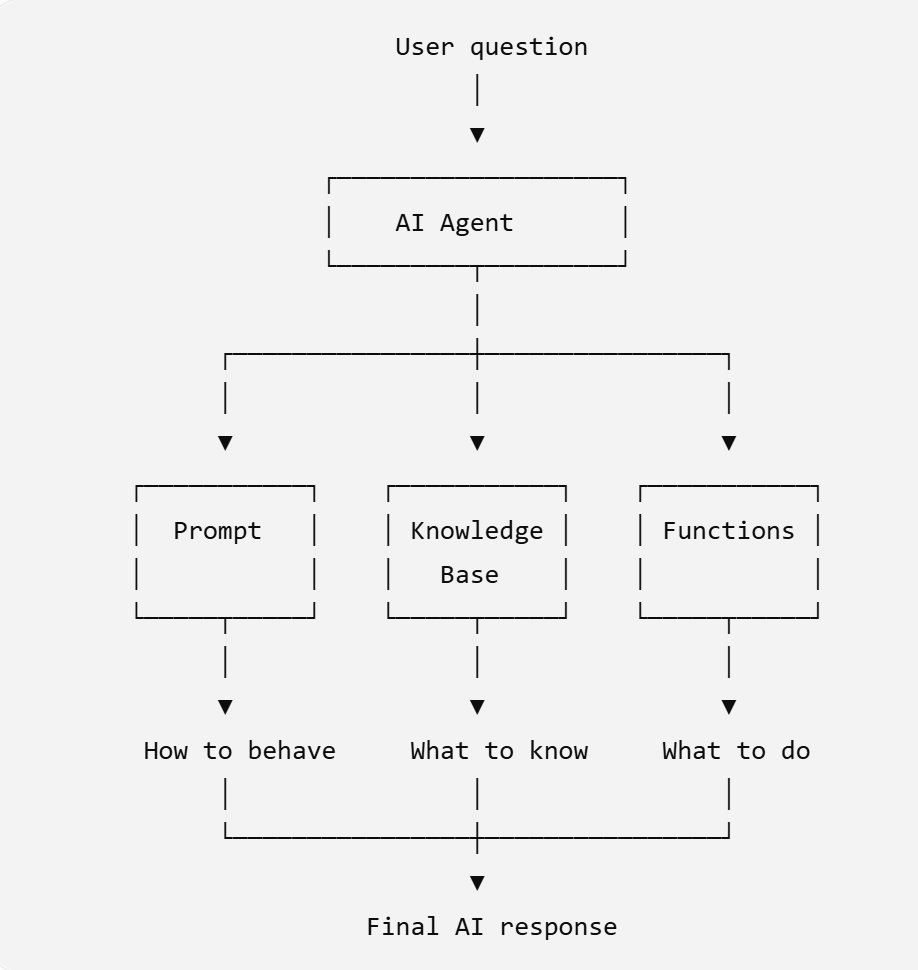
Where prompts are set
Prompts can be configured in different AI-powered blocks depending on what you want the block to do.Structure of a good prompt
A well-structured prompt makes it easier for the AI Agent to understand its responsibilities and consistently follow the expected behaviour. A recommended prompt should contain four sections:- Role
- Instructions
- Tone and guardrails
- Examples
Role
The Role section defines who the AI Agent is, who it serves, and what it is responsible for. Clearly establish the agent’s purpose and boundaries. Avoid giving the agent responsibilities that belong to another system or process.Instructions
Describe what the AI should do and how it should handle different types of questions. Write instructions as clear, actionable rules. Include what the agent should do when it has the required information and what it should do when it does not. Clear instructions reduce ambiguity and help the AI Agent follow a consistent process.Tone
Define how the AI should communicate with users. Specify the desired voice, level of formality, response length, topics the agent should avoid, and situations where the conversation should be transferred to a human.Guardrails
Define what the AI should and should not do. Use guardrails to restrict unsupported topics, prevent the AI from making up information, and define when it should escalate to a human.Complete Prompt Examples
Lead generation prompt:
Customer support agent:
Appointment booking agent:
Good and bad examples
A prompt does not need to be long to be effective. The goal is to make each instruction clear, specific, and actionable.Common mistakes
Conflicting instructions
Conflicting instructions
Avoid giving the AI Agent instructions that contradict each other.
Prompt is too long
Prompt is too long
Adding more instructions does not necessarily make a prompt better.A prompt that contains too many repetitive, unrelated, or overly detailed instructions can make the intended behaviour harder to follow.Keep instructions:
- Clear
- Relevant
- Specific
- Non-repetitive
- Focused on the agent’s actual responsibilities
Putting knowledge base information in the prompt
Putting knowledge base information in the prompt
Do not use the prompt as a replacement for your knowledge base.For example, avoid adding long lists of:
- Product details
- Pricing
- Policies
- FAQs
- Company information
- Delivery information
No instruction for unknown answers
No instruction for unknown answers
One of the most important behaviours to define is what the AI Agent should do when it does not know the answer.Without clear instructions, the AI Agent may attempt to provide an answer even when the required information is unavailable.
No escalation path
No escalation path
Define when the AI Agent should stop handling a conversation and involve a human agent.
Testing and iterating:
Prompt behaviour can change when you add, remove, or modify instructions. Test changes systematically before deploying them.Create a fixed set of test questions
Prepare a list of common customer questions that represent the conversations your AI Agent is expected to handle.- Edge cases — unusual or ambiguous questions.
- Unknown questions — questions that are outside your knowledge base or supported scope.
- Escalation scenarios — questions where the user should be transferred to a human.
- Behaviour-specific questions — questions that test a particular instruction in your prompt.
Test the existing Prompt
When a response does not meet your expectations, determine why before changing the prompt. For example:- The answer contains incorrect facts → Check whether the required information exists in the knowledge base.
- The AI does not follow a specific instruction → Make the prompt instruction clearer or more specific.
- The response is too long → Add a specific response-length instruction under Tone.
- The AI guesses when it does not know the answer → Add a clear fallback rule under Instructions or Guardrails.
- The AI does not transfer users to a human → Add an explicit escalation rule.
- The AI gives different answers to similar questions → Make the instruction more specific and test additional examples.
Change one thing at a time
If the AI Agent does not behave as expected, change only the relevant part of the prompt. For example, if the AI is giving responses that are too long, change the response-length instruction:Compare the results/ Run the same question again
Run the same test cases after making your change and compare the new responses with the previous results. Ask:- Did the AI follow the updated instruction?
- Did the change solve the original problem?
- Did it introduce any new problems?
- Did responses to unrelated questions remain consistent?
- Does the AI still follow the other instructions in the prompt?